All case studies

Case study 05  Quick peek  2 min read

Design Operations Hub

A design-operations concept that connects people, projects, vendors, capacity and planning into one operating view for distributed design teams.

Real operational problem  Self-initiated internal-tool concept / POC

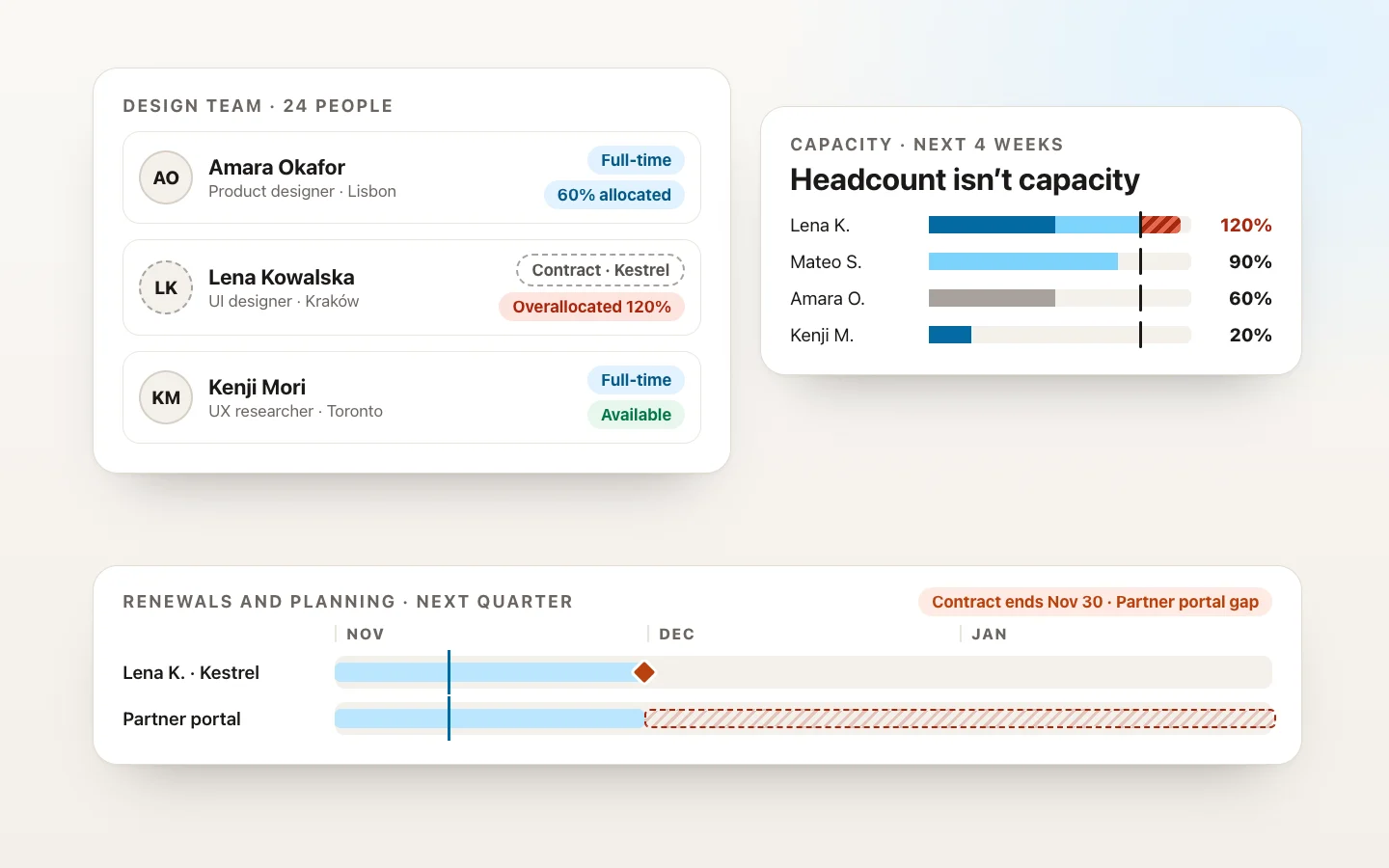
One operating view of a distributed design team: resource cards for full-time and contract designers with their location, vendor and allocation, capacity bars by project with one person overallocated, and a renewal timeline where a contract end leaves a project gap
Role
Product / UX Design, as the design leader with the problem
Users
Design managers and leaders; design ops, resource managers, team leads
Domain
Design operations
Scope
Team, vendors and contracts, project allocation, capacity, planning and spend
Status
Self-initiated internal-tool concept / POC

The operating problem

The problem was not lack of information.

I managed full-time and contract design resources across multiple countries, vendors, time zones, projects, rates and renewal cycles. The information needed to run the team was fragmented, so every leadership question meant reconstructing the picture from scattered tools.

The information lived in
Collaboration tools
Documents
Spreadsheets
Shared drives
Vendor and SOW information
Project assignments
Performance notes
Availability and time off

The real problemThere was no single operating view of the design organization.

The core question

How do you turn fragmented team, vendor, project and budget information into one operating system for design leadership?

Thesis A design team should be managed from one operational view, not reconstructed from scattered tools every time a leader asks a question.

My role

A design leader building the tool I needed

I defined the product concept from problems I encountered while managing a distributed design organization. I mapped the information leaders repeatedly needed, organized it into an operating model, designed the workflows and dashboards, and built the concept prototype.

Self-initiated internal-tool concept / POC. It was inspired by my real design-management responsibilities and operating pain, but it was not a formally deployed enterprise system. Every person, vendor, project, date and cost shown here is invented.

Key insight

The real challenge was not tracking designers. It was understanding the relationships between people, projects, vendors, capacity and cost.

Pivotal decisionI stopped designing another dashboard and started designing an operating model.

The operating model

Seven connected parts, one operating view

People → Vendors → Projects → Capacity → Spend → Performance → Planning. Each part answers a leadership question, and the value is in how they connect.

  1. PeopleWho do we have?
  2. VendorsWho employs them, on what terms?
  3. ProjectsWhat are they working on?
  4. CapacityWho has room, and who is overloaded?
  5. SpendWhat does it cost?
  6. PerformanceHow is each person growing?
  7. PlanningWhat do we need next?

One operating viewEvery part answers its question in relation to the others.

Key design moments

Four moments that carry the story

People-centered operations and collaborative planning, not HR software. Screens are recreated as concept UI with invented people, vendors, projects, dates and costs.

A

Team overview

Problem
Leadership questions required reconstructing information from multiple places.
Decision
Create one normalized view of people, role, location, employment type, assignment and availability.
Why
Answer “who do we have and what are they doing?” immediately.
Synthetic data · Concept UI. Team overview: 24 people across six time zones, filterable into full-time, contract and available now. Six resource cards, each with initials, name, role, city and time zone, how they are engaged (full-time, or contract through a named vendor, with a dashed ring for contractors), what they are working on, and their allocation in words, from available to 120% overallocated
B

Capacity and workload

Problem
Headcount does not equal capacity.
Decision
Show allocation and availability across projects.
Why
Make staffing risk visible before someone becomes overloaded or a project lacks coverage.
Synthetic data · Concept UI. Capacity for the next four weeks: a bar per person split by project, with a mark at 100% of their available hours after time off. Two people are overallocated, shown with a hatched segment past the mark and the words 120% and 110%; others are at 90%, 60% and 50%, and one is available. A note explains that time off is already taken out
C

Vendor and contract visibility

Problem
Contract resources bring renewal dates, vendors, rates and SOW dependencies.
Decision
Connect each contractor to vendor, contract period and project assignment.
Why
Resource planning and financial planning become one conversation.
Synthetic data · Concept UI. Vendors and contracts: three fictional vendor cards, each with its contractors as initials, the number of people and contracts, the next contract end and a sample monthly cost, two of them marked renews in 45 or 60 days. Below, a table connects each contractor to their vendor, contract period and project, with the two contracts that end soon highlighted and labeled ends soon
D

Renewal and planning

Problem
Contract expirations become urgent if discovered late.
Decision
Surface upcoming renewal points and staffing implications.
Why
Convert reactive administration into forward planning.
Synthetic data · Concept UI. Renewals and planning for the next quarter: a timeline across November, December and January with a lane per contractor showing their contract period and a diamond where it ends, and a lane for the Partner portal project showing a hatched coverage gap after one contract ends. Below, two staffing implications with their dates and options, renew or backfill, and buttons to start a renewal or plan a backfill
Prototype

An earlier working prototype, kept private

The earlier working prototype is private. It was built as a concept prototype on real organizational information, so it is not shown or linked here. The screens on this page recreate its important views with invented people, vendors, projects, dates and costs.

POC outcome

What was observed, what the concept shows, and what it doesn’t

No metrics are claimed.

  • Operational problem observed

    • Repeated information gathering
    • Fragmented team, vendor and project data
    • Dependence on multiple files and tools
    • Difficulty seeing capacity and renewal risk in one place
  • POC outcome

    • Unified the operating model
    • Demonstrated relationships between people, vendors, projects, capacity and spend
    • Created a prototype for answering common leadership and resource-planning questions from one place
  • Still unvalidated

    • Adoption
    • Time savings
    • Integration feasibility
    • HR / finance system integration
    • Permission model
    • Data governance
    • Production performance
View the deep dive