All case studies

Case study 04  Quick peek  2 min read

AI Insurance Quote

An AI-native insurance concept that turns a long application into a guided conversation while keeping the structured form, quote logic and human fallback visible.

Concept / POC  AI-native insurance experience

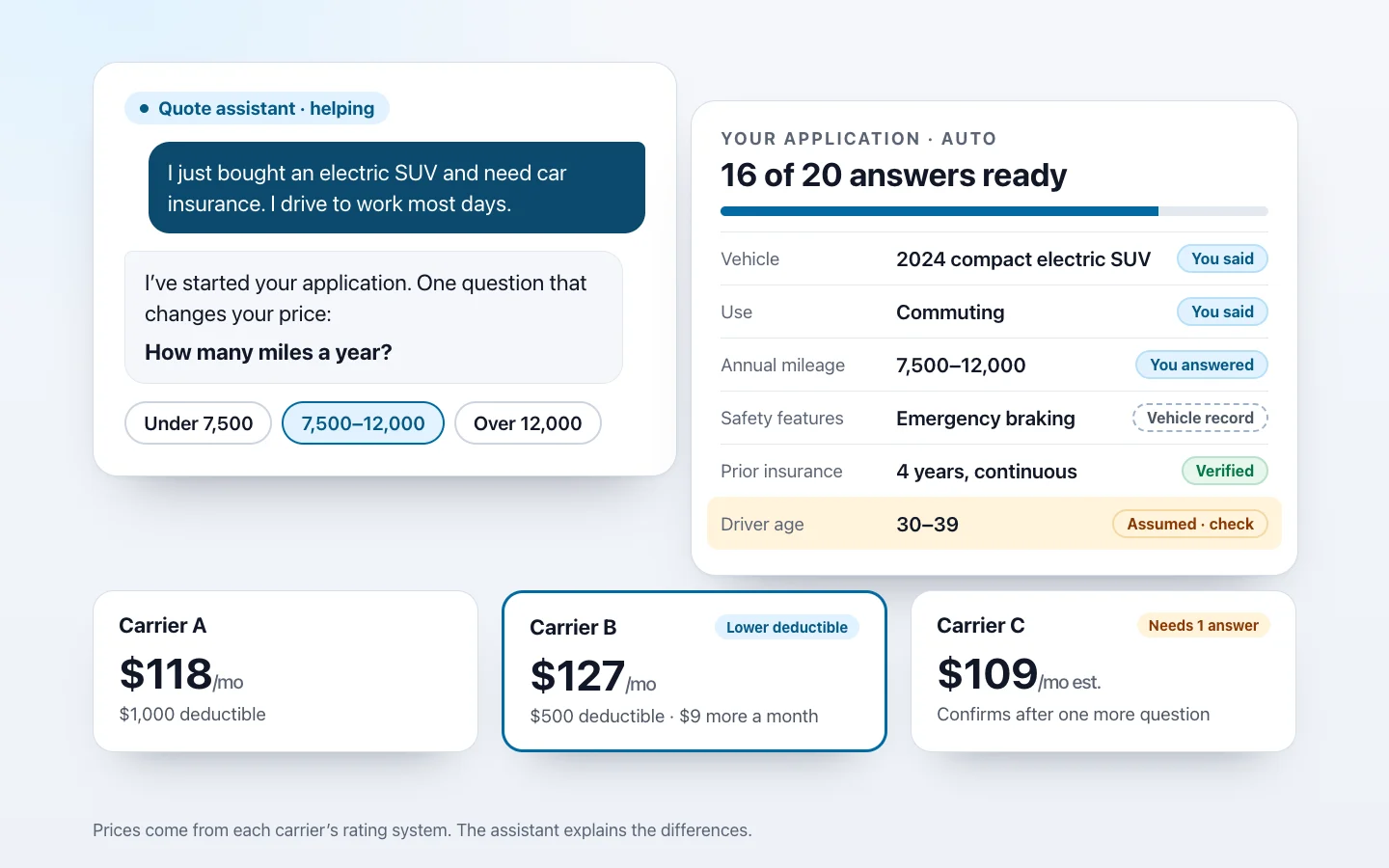
A conversation, the application it fills and the quotes: the customer says they bought an electric SUV and drive to work, the assistant asks one question that changes the price with three answer choices, the application shows 16 of 20 answers ready with a source on each, from You said to Vehicle record, Verified and Assumed, check, and three quotes from Carrier A, B and C, priced by each carrier’s rating system
Role
Product / UX Design
Users
Insurance shoppers, with licensed agents and brokers as fallback
Domain
Insurance quoting and buying
Scope
Conversational intake, verified prefill, application state, quote comparison and fallback
Status
Self-initiated concept / working prototype

The problem

Customers fill in the system’s form before they get any value.

Traditional insurance applications can require many sections, repeated fields, conditional questions and supporting documentation. The customer adapts to the system’s form before they see any value.

Emerging AI-based insurance experiences suggested a shift toward conversational quotation and comparison, which prompted exploration of what an AI-native insurance journey could look like.

The core question

What if we stopped forcing customers to fill the system’s form and instead made the system understand the customer?

My role

From conversation model to working prototype

This was a self-initiated concept, informed by my real insurance-domain experience. I designed the conversational intake model and the visible application-state pattern, created the key screens and built a working prototype.

Self-initiated concept / POC, informed by real insurance-domain experience. In the prototype, simple rules stand in for a language model and for carrier rating systems, and every customer, vehicle, quote and ID is synthetic.

Pivotal decision

The form moves behind the conversation; it doesn’t disappear.

AI doesn’t eliminate underwriting requirements. The system still needs structured data; the experience changes how customers provide it.

Product principleConversation is the interface. Structured application data remains the system of record.

The journey

Nine stages, from conversation to bind

The structured application fills as the customer talks, and stays in view the whole way.

  1. Conversation
  2. Minimum necessary information
  3. Secure verification
  4. Authorized retrieval / prefill
  5. Visible application state
  6. Quote comparison
  7. Additional underwriting
  8. Human / broker fallback
  9. Bind

The full form and a licensed agent or broker stay available at every stage. Nothing binds until the customer confirms.

Key design moments

Four moments that carry the story

Screens are recreated as concept UI with synthetic data: an invented customer, vehicle, address, quotes and IDs, and generic carriers.

A

Start with intent

Problem
Applications start with the system’s questions, not the customer’s need.
Decision
The customer describes what they need in natural language, and the application starts from their words.
Why
The first step is the customer’s intent; the structured record fills from there.
Synthetic data · Concept UI. A conversation beside the application. The customer writes: I just bought an electric SUV and need car insurance, I drive to work most days. The assistant replies that it has started the application and will only ask what changes the price. The application panel shows 4 of 20 answers ready, each with its source: auto insurance, the vehicle and its use marked You said, the number of drivers marked Assumed, check, and identity and payment marked Not yet, needed later only if the customer chooses
B

Keep the application visible

Problem
Answers hidden inside chat bubbles can’t be checked or corrected.
Decision
As the conversation progresses, structured fields are filled visibly, each with its source, so the customer can inspect and correct them.
Why
The conversation is the interface; the application stays the system of record, in view.
Synthetic data · Concept UI. The application panel, wider than the conversation, shows 16 of 20 answers by section, each with its source: the vehicle and city the customer said, safety features from a vehicle record, driving history and prior insurance from verified records, and an assumed deductible highlighted to check. In the conversation the customer corrects their age and the assistant confirms the field now says You said. A legend explains the sources, with buttons to edit any answer or open the full form
C

Verify before sensitive retrieval

Problem
Asking for identity details in a chat, or retrieving records silently, erodes trust.
Decision
Never ask for or expose sensitive identity information in chat. Retrieve records only after secure verification and the customer’s confirmation of what will be retrieved.
Why
Prefill saves effort only when the customer has authorized it and can see where each answer came from.
Synthetic data · Concept UI. Before any records are retrieved, the assistant explains it can fill driving and insurance history only after the customer verifies their identity, and that it never asks for a license or Social Security number in the chat. A secure card lists exactly what will be retrieved, with driving history and prior insurance checked and claims history unchecked as not needed, buttons to verify securely or answer these questions instead, and a note that the check opens outside the conversation. The application panel shows those two fields as not retrieved yet
D

Compare quotes clearly

Problem
Differences between quotes are hard to see side by side.
Decision
The assistant summarizes the differences, but carrier rating systems determine actual pricing, and any additional underwriting shows before a price is final.
Why
A plain-language comparison, without the AI setting prices.
Synthetic data · Concept UI. Three quote cards for the same application from generic carriers: Carrier A at $118 a month with a $1,000 deductible, Carrier B at $127 a month with a $500 deductible, marked lower deductible, and Carrier C at an estimated $109 a month that needs one more answer before it can confirm. Above them, the assistant’s summary explains the differences in plain words. A note says prices come from each carrier’s rating system and the assistant explains the differences but does not set prices. Buttons continue with Carrier B or answer Carrier C’s question
Working prototype

Try the quote prototype

Earlier working prototype. It was built first to explore conversational intake, source-labeled answers and quote comparison; the screens above show the evolved direction. Simple rules stand in for a language model and carrier rating systems, and all data is synthetic.

Try the quote prototype (opens in a new tab) Opens in a new tab  best on a desktop screen

POC learning

What the concept shows, and what it doesn’t

No business metrics are claimed. This has not been tested with customers.

Demonstrated in the concept

POC learning

  • Tested how conversational intake can coexist with structured underwriting data
  • Demonstrated progressive disclosure
  • Explored transparency around prefill and source attribution
  • Created a path from conversation to quote comparison without removing human fallback

Not yet validated

Still unvalidated

  • Consumer usability
  • Underwriting completeness
  • Quote accuracy
  • Carrier integration
  • Identity verification flow
  • Regulatory / privacy review
  • Conversion impact
View the deep dive